Nothing lapses on your watch.
RenewLock is a software license renewal tracker for SharePoint. It counts every license and subscription down to the day it must be renewed, prompts the owner in Teams with a card they can answer, escalates when nobody does, and keeps a record of all of it. It runs inside the Microsoft 365 you already pay for.
No Dataverse. No premium connectors. No per-user or per-alert pricing. Built for teams that run more than one network.
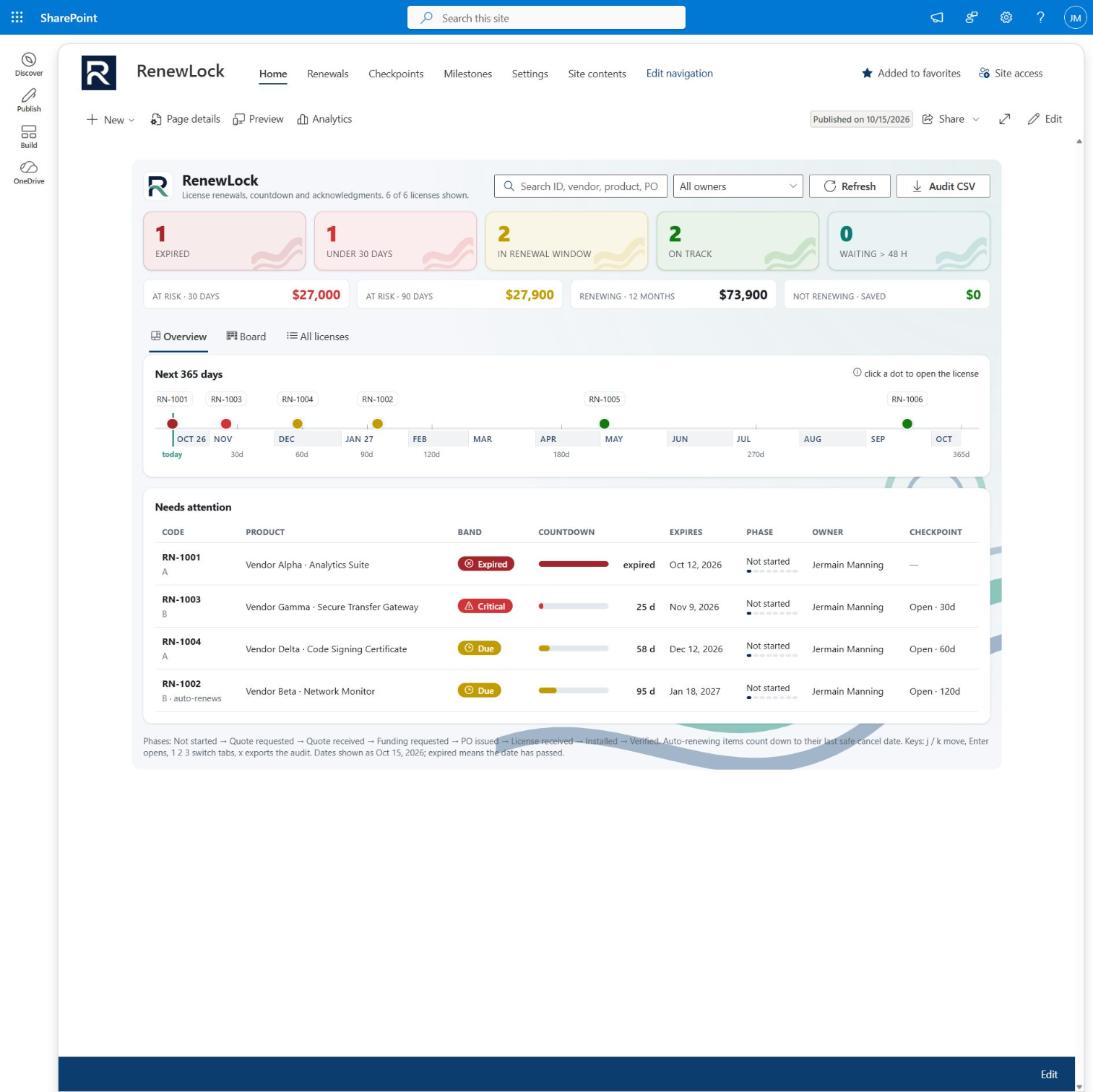
How the SharePoint license renewal tracker works
Four SharePoint lists hold the data. Three Power Automate flows do the work. One web part shows the state of play.
Count down, every morning
Each renewal is checked daily against its expiry, or against its last safe cancel date if it auto-renews. It lands in a band: Clear, Due, Critical, Expired.
Prompt the owner in Teams
At 120, 90, 60, 30, 14 and 7 days a card arrives. The owner answers on the card: on it, renewed, not renewing, or hand off. An email twin goes out for people who live in Outlook.
Escalate when nobody answers
No answer in 48 hours goes to the backup owner. Still nothing goes to the supervisor. An owner whose account is gone escalates immediately. Every step is recorded.
RenewLock vs. other SharePoint renewal trackers
We looked at a dozen renewal and contract trackers built for SharePoint. They send an email N days before expiry and stop there.
| Capability | Typical SharePoint tracker | RenewLock |
|---|---|---|
| Escalation chain: owner, backup, supervisor | None | Yes, on a clock |
| Teams card the owner can answer | Notify only | Four actions on the card |
| Audit of who was warned and what they said | Email with no record | Every prompt is a row, one-click CSV |
| Auto-renew notice period | Plain date field | Countdown to the last safe cancel date |
| Cost at risk by 30 / 90 / 365 days | Full contract suites only | Built in, can be hidden |
| Separated or classified networks | Not considered | Opaque mode: codes and dates only |
| Licence model | Per user or per alert rule | Flat, per tenant |
License tracking for classified and separated networks
When the people who know the expiry date can't talk about the system on the low side, renewals get missed. RenewLock tracks each licence by an opaque code. The code-to-system key stays inside the enclave.
Codes, not names
The unclassified side holds the code, vendor, product, dates, owners and PO. Never a hostname, enclave or version.
Opaque mode
One switch hides vendor, product, part and cost from the dashboard. Procurement keeps the data in the list.
Nothing leaves the tenant
No external service, no outbound calls, no telemetry. Standard connectors only. Commercial, GCC and GCC High.
RenewLock pricing: flat, per tenant, no meters
Competitors charge per user or per alert rule, which punishes exactly what a renewal tracker should encourage. We charge per tenant, per year, and we do the first install.
- One site, unlimited users
- Email support, updates
- First install included
- 30-day money-back
- Unlimited sites in one tenant
- Priority support
- Quarterly review
- First install included
- Everything in Tenant
- Opaque-mode configuration
- GCC / GCC High install
- Compliance note and codebook template
Frequently asked questions
What do I need in my tenant?
SharePoint Online, Power Automate with standard connectors, Teams and Exchange. Nothing premium. A SharePoint admin uploads one app package and imports one solution; we do it with you on the first install.
Is this a contract management system?
No, on purpose. No clause library, no e-signature, no redlining, no vendor CRM. RenewLock is the countdown and the accountability around it. Keep your contracts where they are.
Where does the data live?
In four lists on your SharePoint site. The dashboard reads and writes those lists directly. The flows run under your accounts. Your retention labels apply as usual.
What happens when an owner leaves?
The daily engine checks each assignee's account. A disabled or missing account escalates to the backup owner at once and flags the renewal so you can reassign it.
Can I try it?
Yes. The Site tier carries a 30-day money-back guarantee, and the first install is included at every tier.
See it on your own tenant
Twenty minutes, your screen, your SharePoint. We'll show the countdown, the card, the escalation and the audit, then leave you the install guide.
jermain@jrmanesystems.com